

How do I generate dozens of ad concept variations from one 3D scene setup without rebuilding it each time?
Build the scene once, then express every difference between the ads as a named parameter on that scene and change the parameter. The part worth planning before you start is which parameters are safe to change. Camera, crop and prop visibility move the view onto geometry that stays put. Lighting and environment changes move the illuminant, and the illuminant is what decides your product's on-screen colour even when nobody touched the material.
What counts as a variable when the 3D scene is the source of truth
A variable is a property of something that already exists in the scene. The variant systems draw that line themselves, and in Cinema 4D it is written down. Maxon states that the Take system primarily only varies properties of existing elements, and that render visibility counts as one of those properties. Hiding a prop is a variable. Adding a prop that was never modelled is a scene change wearing a variable's clothes, and it costs what a scene change costs.
Epic enumerates the same axes for its Unreal template: geometry variation using Actor switching, material and visibility options, camera position and setting variation, and lighting and environment variation. That list is close to the one a brand-ops team writes on a whiteboard, which is the useful signal here. The variable set is settled. The argument is about what runs it.
Three routes to a variation set, compared on the same three questions
A fourth row sits below the three, because ad-platform permutation gets recommended for this job and works on a different input entirely.
| Route | How a variant is expressed | What the setup asks for | What it is genuinely best at |
|---|---|---|---|
| Scripted 3D application (Blender, Cinema 4D) | A node graph, a driver, or a named Take. Blender documents Geometry Nodes as a system for modifying an object's geometry with node-based operations, reached by adding a Geometry Nodes Modifier and setting up the nodes in the Geometry Node Editor. Maxon documents the Take system as making multiple states of a scene, including object, material, render and camera settings, available in a single file. | Node-graph or scripting literacy. Blender's drivers are a way to control values of properties by means of a function, or a mathematical expression, and the manual warns that a driver falling back to Python is slower, with a security risk if the author of the Python code is unknown. Scripting it means writing against bpy, one of the Python modules Blender provides to the embedded interpreter so they can be imported into a script and give access to Blender's data, classes, and functions. | Unattended volume. Blender renders from the command line with no need for a graphical display, so it can render via a remote shell. On the Maxon side, a command-line flag renders a specific Take. That is the documented hook an unattended overnight batch hangs on. |
| Real-time configurator (Unreal product configurator template) | A configuration in the Variant Manager, a panel that organizes configurations of properties for Actors and stores them in a LevelVariantSet Actor. | The setup starts upstream in a 3D application: Unreal supports Datasmith and the FBX Content Pipeline for importing from Maya, 3ds Max and Blender. Epic addresses the template to 3D visualization artists, with no mention of marketers. | Live, interactive review, and cheap variants after an expensive build. Epic lists the ability to add new variations without using Blueprint code. If the deliverable is a configurator someone clicks through rather than a folder of stills, that is what Epic's template starts from. |
| Persistent directed 3D scene (Intangible) | A change to the saved scene. Intangible's Visualize page says it renders from your scene, not a prompt, and your geometry, references and framing stay consistent. Its retail page describes the loop as swapping a finish, a color, a SKU, or a season, then sending a camera down the aisle. | Composing the scene and directing the camera. Intangible's Compose page states that the shot you compose is the shot that gets rendered. | Holding one asset identical across a set. Intangible's Build page says you upload your logo lockup and the logo stays faithful across forty endcap variations. |
| Ad-platform permutation (responsive display, catalog ads) | Recombination of assets that are already finished. Google states that you upload your assets and Google will automatically generate ads. Meta's catalog ads display relevant items from your catalog feed. | An asset set or a product feed. Both platforms document assembly from assets you supply, which puts the render work upstream of them. | Placement coverage. Google says responsive display ads are built to reach across almost any ad space and can show in thousands of layouts. The trade is control: Google also states that your ads may not show all of your assets. |
The routes are not exclusive. The permutation layer sits downstream of whichever one made the imagery, and a hybrid route puts a model downstream of the 3D scene. What you are choosing between is where the source of truth lives and who is allowed to touch it.
Which variables are safe to vary, and which quietly break brand fidelity
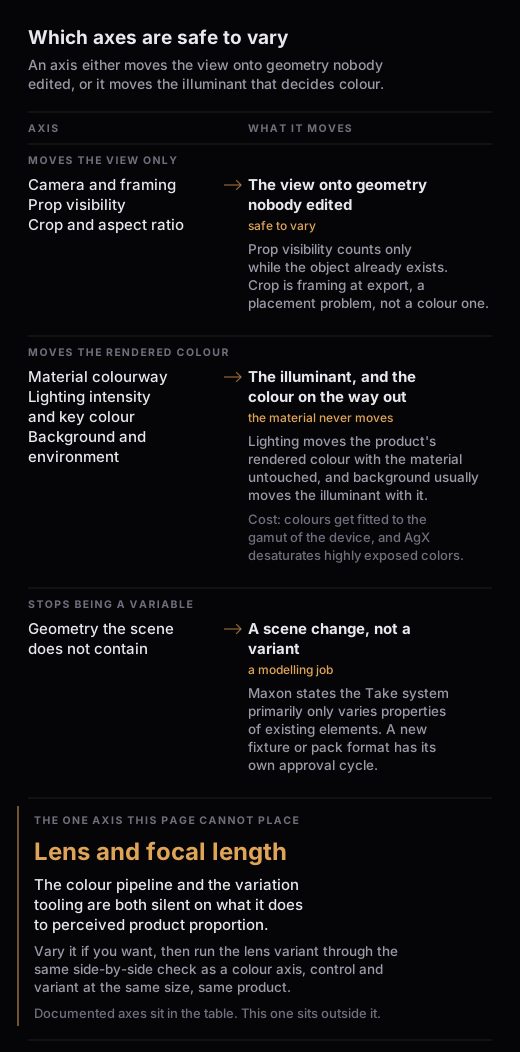
This is the part that decides whether a set holds together. They list the axes and assume a variable is a variable. Some of them only move pixels. Some of them move your product's colour while leaving every material value in the file exactly where you set it.
| Variable | What actually changes | What it can break |
|---|---|---|
| Camera position and framing | The view onto geometry nobody edited | Composition only. Intangible describes the camera as a set-once decision, saying to place the camera once and render the same hero move in any city, any season. |
| Prop visibility | Whether an object that already exists gets rendered | Nothing, as long as the object exists. Maxon states that the Take system primarily only varies properties of existing elements, and that render visibility is only a property. |
| Material colourway | The surface, not the shape | The output colour, on the way out rather than in the file. Blender documents that because display devices cannot show the full spectrum of colours and have limited brightness, colours must be fitted to the gamut of the device. |
| Lighting intensity and key colour | The illuminant | The product's rendered colour, with the material untouched. Blender documents AgX as offering wide dynamic range and desaturating highly exposed colors to mimic film's natural response to light. |
| Background and environment | The surround, and usually the illuminant along with it | Everything lighting breaks, plus reflected colour on the product. Epic lists lighting and environment as one variation axis, though it stops short of saying the two have to move together. |
| Crop and aspect ratio | Framing at export | Whether the composition survives the placement, which is a planning problem rather than a colour one. |
The colour half of that table has a mechanism worth stating plainly. The International Color Consortium describes metamerism, where colours can be seen to match despite having different spectral composition, and such a match will generally fail when the light source shining on the sample is changed. ICC is describing physical samples under real light. ICC does not extend that to renders. It carries anyway, because a variant set changes the illuminant deliberately, one variation at a time. That is the exact condition under which a match stops holding.
There is a documented control for it. Blender lists Khronos PBR Neutral as a tone mapping transform designed specifically for PBR color accuracy, to get sRGB colors in the output render that match as faithfully as possible the input sRGB base color in materials, under gray-scale lighting. Read the last clause twice. The transform is built to hold your brand colour, and the condition it states is grey-scale lighting, which is the condition a lighting-mood variant deliberately leaves.
Two more mechanics decide whether a set holds. The first is global and gets set before anything renders: Blender's manual states that the working space affects the colors of all data-blocks in a file and should generally be chosen at the start of a project and used for all blend files. It is not a per-variant knob and treating it as one contaminates the whole set. The second is how the brand asset gets into each variant. Blender documents Link as creating a reference to data in a source file, such that changes made there will be reflected in the current file the next time it is reloaded. A copied logo is a set of separate logos that happen to look alike today.
Referencing on its own is too rigid for a variation set, which is why the override model exists. Blender documents Library Overrides as a system designed to allow editing linked data, while keeping it in sync with the original library data. That design is the shape a fidelity check needs: a variant deviates on the properties it names, and everything it did not name is meant to keep tracking the master. Intangible describes the same shape in product terms, saying it keeps scenes consistent shot to shot because every shot comes from the same 3D scene.
Below all of it sits the standards answer to cross-device agreement. The ICC states that profiles define the relationship between the digital counts your device receives or transmits and a standard colour space defined by ICC and based on a measurement system defined internationally by CIE. Do not assume an embedded profile survives upload to an ad platform. It is the last link in the chain, so treat the export step as unverified rather than safe. The check that costs nothing: export one control asset, put it through the same upload path the set will take, and compare what comes back against the control before you commit the rest.
One axis stays off both lists. Changing lens or focal length reads like a free variation, and the documentation for both the colour pipeline and the variation tooling is silent on what it does to perceived product proportion. Vary it if you want, then run the lens variant through the same side-by-side check as a colour axis: control and variant at the same size, same product, and if the shape reads differently to a reviewer who did not make it, the lens moved something camera position does not.
The order to produce a set in
This list is written for the scripted 3D route, because that is the route whose documentation states what each step does. Sequence matters, because two of these steps are one-way doors.
- Fix the working colour space and the view transform first. Treat both as file-level decisions rather than per-variant knobs: if either moves mid-set, everything rendered before it gets rendered again.
- Bind the brand asset by reference, not by copy. A linked asset with named overrides is the mechanism that lets a variant deviate on a colourway while the logo keeps tracking the master.
- Render one control frame and approve it. This is the frame every later variant gets compared against, so it has to survive a brand review before it has siblings.
- Move one axis per pass. Do the pixel-only axes first, prop visibility and camera and crop, then the illuminant axes, so a colour problem is attributable when it appears.
- Sanity-check the colour axes against the control. Put the control and each illuminant variant side by side at the same size, sample the same three points on the product in each, and flag the variant if a reviewer who did not make it can name the difference. No documentation states a threshold, so agree the pass mark with your brand reviewer on the control frame before the set runs.
- Leave crop and aspect to the placement layer last. Google states that responsive display ads can show in thousands of layouts. That makes crop a distribution problem rather than a creative one.
On a hosted persistent scene, the first two steps are not yours to run. The first-party pages do not state what the working colour space, the view transform, or reference-versus-copy asset binding are inside a tool like that, or whether the product settles them for you. That is a gap to put to the vendor, not something to assume is handled. Steps 3 to 6 run as written, and the approved control frame is the check you have.
One number is missing on every route: where it stops scaling. Blender, Maxon and Epic all document that batching is possible without stating a ceiling. Plan the first set as a real test of throughput rather than trusting a vendor figure.
Where the ad platform takes over
The permutation count you see reported at the campaign level is not the render count you owe. Every crop, every product colourway, every seasonal treatment you want a placement to be able to serve has to exist as a rendered asset before the platform can pick it, and reading the campaign number as a render number is how variation-set scope explodes.
Where this stops being the right approach
A variant that needs geometry the scene does not contain is not a variant. Maxon draws that line explicitly for Takes, and where your own tool draws it is worth checking before you plan the set: a new fixture, a new pack format, a redesigned product is a modelling job with its own approval cycle.
Engineering-accurate work belongs on the scripted route. If a variant has to be dimensionally correct, or has to come off the same file engineering signs off, the 3D application that owns the source geometry is where the set gets made, and the scripting cost is the price of that correctness.
Interactive review belongs on the configurator route. If the deliverable is a stakeholder clicking colourways live in a meeting rather than a folder of stills, Epic's template is a starting point for exactly that interface and the still-image routes are working against their grain.
And if the whole job is layout permutation over finished imagery, do not build a scene at all. The ad platforms already do that, they do it at placement scale, and the honest read on their limit is that they will also decline to show some of what you gave them.