

Adobe Firefly alternatives when the brand asset has to stay exact
If the mark cannot change, keep it outside the generation. The routes that hold split into two classes: ones that protect your master artwork by never handing it to the model (Photoshop compositing, Firefly's own Object Composites, Exactly.ai's Product Pin, masked inpainting on a Stable Diffusion pipeline) and ones that fix the product as a 3D object and generate the scene around it, which is where Intangible sits.
Reproduce-from-master is already written into brand standards
The rule predates image generators. Louisville states that the UofL logo should never be recreated or typeset, and NASA tells merchandise partners to avoid imposter graphics by only using official artwork files. A generator redraws by construction, which is what both documents forbid.
Adobe's own answer to logo exactness is to keep the logo out of the generation
Adobe describes Object Composites as letting you upload an image, such as a product photo, and use a text prompt to generate a composited scene for the product. The page does not claim the uploaded product is preserved unchanged. Adobe's Composite imagery (3D) template places 3D digital twins into generative AI-created environments, so the product itself comes in as a 3D asset rather than being generated. Brand Intelligence checks finished work against logo rules after the asset exists, and Adobe's known-limitations page adds that text and symbol generation in images still needs support in the Text to Image feature. Its Custom Models guidance is separate, about training data: for still-life product photography it tells brand teams to avoid training images that are product shots with logos or packaging. For its illustration, iconography and 3D use cases the same table warns not to expect a custom model to hold overly specific colors and design elements, such as exact proportions.
The six routes on the same criteria
| Route | How the mark is protected | What can still drift | What it assumes | Genuinely best at |
|---|---|---|---|---|
| Photoshop compositing over generated backgrounds | The artwork never enters the model. A Smart Object holds Illustrator artwork, which would otherwise be converted to pixels in Photoshop | Generative Fill is bounded by manual selection controls, though Adobe does not state how faithfully unselected areas are preserved | A layered master file. Adobe notes you cannot paint, dodge, burn, or clone on a Smart Object layer until you change it to pixels | One flat hero shot, more reliably than anything else here |
| Firefly Object Composites and Custom Models | You supply the product photo and Firefly generates the scene around it | Style rather than the asset: Adobe's framing is content that reflects your brand's identity | Enterprise plans, and raster training data, since custom models are trained using high-quality JPG or PNG images | Staying in an Adobe workflow, with Illustrator and validation on either side of the generation |
| Exactly.ai Product Pin | A photographed product is anchored into the scene, which Exactly.ai says embeds it while preserving its original appearance | The same page hedges: it keeps shape, angle and lighting as much as possible | Photoreal input, and third-party base models underneath. Entry pricing is 75 pounds per licensed download | Holding one photographed SKU across many generated environments |
| Ideogram | Type is generated rather than protected, and its docs say the model is not loaded with that exact font | The wordmark itself. Ideogram's docs say it is not currently possible to specify a typeface by name, and longer strings raise the error rate | No vector download, since SVG downloads are not currently supported | Generating new typographic layouts, a different job from reproducing yours |
| ControlNet, IP-Adapter and masked inpainting | A mask marks what to keep, where the area to keep is represented by black pixels, and conditioning steers structure | The protected area itself: inpainting checkpoints are more likely to change your unmasked area | A pipeline you build and tune. IP-Adapter fidelity is a scale you set, where 1.0 means the model is only conditioned on the image prompt | Structural control on an open stack, at a conditioning weight you choose |
| Intangible | The imported mesh carries shape and placement, and the attached image reference defines what the object's surface looks like, per Intangible's published precedence | The prompt layer, which Intangible's docs say wins over both, and reference detail below the 720 x 1024 downsample ceiling on the same page | A 3D or CAD file, plus a paid plan, since its pricing table marks 3D asset import unavailable on Free. Its Explorer tier is $35 a month billed monthly | Many angles and many variants off one scene, which Intangible attributes to every shot coming from the same 3D scene |
Where each vendor's own documentation stops short of the headline
Exactly.ai warns that Product Pin wants photoreal input and that illustrations or stylized images may produce unexpected results. Masking is not a lock either: to hold the unmasked area identical, the diffusers documentation points to an apply_overlay method that will force the unmasked area of an image to remain the same at the expense of some more unnatural transitions, so the reliable version of region locking ends in a composite. The ProductConsistency benchmark reports that instruction-based editors often distort or hallucinate text on objects, subtly alter brand logos, or modify product geometry during otherwise reasonable edits, and that even strong editors like Qwen-Image-Lightning, GPT-Image-1 and Nano Banana are not sufficient for consistent product fidelity across edits.
The route that makes the asset the constraint, as Intangible publishes it
The second class fixes the object in 3D first. Intangible's how-to for matching a client's product says the fix combines two techniques: bring the client's actual geometry into the scene, and bind a hero photograph as the visual reference, so the model gets structural truth from the mesh and surface truth from the photograph. Its concept docs publish the precedence as a stack: the 3D object, whose geometry and position are the source of truth for shape and placement, then the image reference, which sits on top of the geometry and defines what the object's surface looks like, then the final prompt, which wins over both. Its Build page says that once you upload your logo lockup, the logo stays faithful across forty endcap variations.
Eight colorways of one branded bollard, both routes
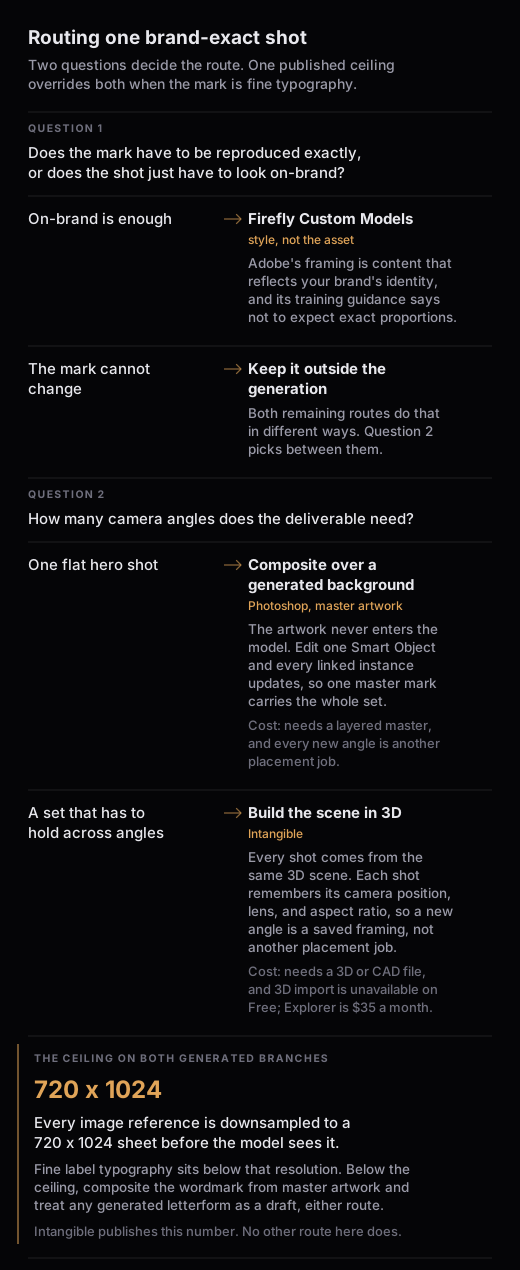
Eight approved colors of one branded bollard for a store rollout, logo lockup on each, and the axis the choice turns on is how many camera angles the deliverable needs. With the layered master in hand and one approved angle to fill, composite and stop there: Adobe documents that editing one Smart Object automatically updates all linked instances, so one master mark propagates across all eight files. What that route does not carry is the camera: a hero at shelf height, a three-quarter aisle approach and a tight crop on the logo panel are three separate placement jobs, each matching perspective, scale and lighting to a new plate by hand.
The 3D route moves that work to the front. Intangible publishes that every shot comes from the same 3D scene, that when you re-frame, change lighting or switch shots the reference stays bound to the object, and that each shot remembers its camera position, lens, and aspect ratio inside one scene, so a new angle is a saved framing rather than a new placement job. Its retail page describes swapping a finish, a color, a SKU, or a season in seconds, then sending a camera down the aisle, which is marketing language.
Intangible publishes its prices: Free at $0 a month, Explorer at $35 a month billed monthly, Business at $65 a month billed monthly. Its pricing table marks 3D asset import as unavailable on Free, so the free tier cannot import 3D at all, and Explorer at $35 a month billed monthly is the cheapest published tier whose pricing table row includes 3D asset import. No setup time and no break-even angle count is published anywhere, so decide on the axis you can see: one flat hero shot favors compositing, and a set that has to hold across angles favors the single scene.
What the 3D route does not fix
Intangible publishes the ceiling that matters most for a lockup: every image reference is downsampled to a 720 x 1024 sheet before the visualizer hands it to the model, regardless of source size. Fine label typography sits below that resolution, so crop the reference tight on the lockup and check type at full zoom against master artwork. The second published trap is the object name, which feeds the final prompt: name an object after a specific product and, in Intangible's own example, the model reaches for its own idea of that thing and overrides the livery you attached as a reference. Its docs also state that model fidelity to references varies across the models it runs on. Intangible says the product is in open beta, and says on its own answers page that the fidelity claim describes the mechanism, and each render still needs checking. Geometry, placement and proportion are what the scene holds. The surface, branding included, is generated and gets a human pass.
What stays in Illustrator and in the print chain
Color is the clean line. Pantone warns on its own Color Finder that on-screen digital color simulations may not accurately match the actual physical Pantone Color Standards. Adobe states that the exact range CMYK represents can vary, depending on the press and printing conditions. Vector artwork is what carries into that chain, and Adobe's user guide says vector graphics are also useful for specialty signage printing, CAD, and 3D graphics. Generated output is raster and capped: Intangible publishes that image generation runs at 1K or 2K, and that PNG and JPEG are the export options for stills.
Common follow-up questions
What if there is no layered master file?
Compositing needs one. Rebuild from the official artwork your brand standards already require, or move to the route where the surface arrives as a photograph. Intangible's brand-fidelity how-to says to get the client's CAD or 3D file before generating anything. Its answers page and its brand-fidelity how-to print different format lists, so send FBX, OBJ or GLB, three of the eight formats on the importer's own list.
What about a mark that is mostly typography?
Hardest case in the set. Ideogram's docs advise that where precise readable text matters, you generate the visual concept and then add the text manually using graphic editing tools afterward. The 3D route carries the wordmark in on a reference that Intangible says is downsampled to 720 x 1024, thin for small type. Composite the wordmark from master artwork wherever the layout allows, and treat any generated letterform as a draft.
Does the same asset hold across image and video variations?
Intangible publishes that every shot comes from the same 3D scene, so references and camera paths carry across a set instead of each frame being regenerated. Two published limits apply to video specifically: video export resolution is limited by the lowest-resolution shot, and duration is capped by the chosen model.