

How do I move the camera around a CAD model the same way every time for a review deck?
Save the camera itself, with its numbers, and recall it against every revision instead of re-framing by hand each cycle. When the viewpoint is stored rather than remembered, the differences the room sees at the next review are differences in the assembly.
What you are saving when you save a camera
A camera is a short list of values, and every one of them is written down somewhere you can read. Autodesk's Fusion API describes its camera as analogous to a real camera, which "has a position in space, is pointed towards a specific point, is oriented in a particular way, and has a specific type of lens". Fusion also exposes the up vector as its own setting, so orientation is a stored number rather than a by-product of where you last dragged.
The same list turns up in file formats no single vendor owns. In glTF, "a camera is instantiated within a node using the node.camera property", and each camera "defines a type property that designates the type of projection (perspective or orthographic)". OpenUSD carries the same set: a numeric focal length attribute, a projection token whose "allowed values" are "perspective, orthographic", and a world transform that "positions the camera in the world". Two interchange formats, no shared vendor, same camera.
Blender fills in the lens end of it. Its Python API gives focal length as a value in millimetres defaulting to 50.0, and sensor width as a separate millimetre value defaulting to 36.0, and the manual adds that "the focal length can be set either in terms of millimeters or the actual Field of View as an angle".
The record you need for a repeatable view is therefore: eye position, aim point, up vector, focal length with the sensor size or field of view that gives it meaning, projection type, and the aspect ratio of the frame. Anything that stores all of those can reproduce the view. Anything that stores fewer will drift, and the drift will look like a design change.
Three routes to the same repeatable view
Same three criteria for each: what actually gets stored, what it asks of you, and what it is genuinely better at than the other two. Where each one stops gets its own section at the end.
| Route | What gets stored | What it asks of you | Genuinely best at |
|---|---|---|---|
| Saved or named views in the CAD package | A named viewpoint held with the model, in the vendor's own terms: orientation, zoom, and in some packages display state | Nothing beyond the licence you already have | Zero-cost repeatability inside one package, on the live master model |
| Scripted camera coordinates | Explicit numbers you own, in a file outside the model | An API, a build step, and someone to maintain it | Applying one standard set of angles across many assemblies, identically |
| A 3D scene where the camera is an object | A camera as a scene object with its own transform, independent of the geometry | A mesh export, and a scene to maintain alongside the CAD | Reusing one stored camera across a set of shots in a scene, independent of any CAD package |
Saved and named views inside the CAD package
For a lot of readers this is the whole answer, and it costs nothing to start. Inventor's View representations "preserve a part or assembly display configuration that you can recall by name", and what gets stored includes zoom magnification, viewing angle and camera view alongside visibility and appearance state. Onshape's named views "capture the perspective, the zoom scale, and the orientation of the current view". Creo saves "the orientation of the view relative to the screen and any pan and zoom orientation associated with the view". In Fusion, applying a named view "updates the active viewport to use the camera associated with this named view".
One trap before you build the set: do not use the standard orientations as your repeatable views. Autodesk's documentation for Fusion's view orientation property says "the view orientations cannot be expected to be consistent from one view to another". Fusion's four standard named views, TOP, FRONT, RIGHT and HOME, are built in with "limited functionality", so you cannot redefine them into something stable either. Make your own named views and use those.
Scripted camera coordinates
Take this route when the numbers have to come from outside the model: a table of standard angles, or a review pack that has to be produced the same way by whoever is on shift. Fusion's API can construct a camera "to be used as input to modify a viewport, and create or update a named view", so the saved viewpoint becomes something you generate rather than something you nudge into place. PTC exposes the same idea from both of its toolkits: "The ProViewStore() and ProViewRetrieve() functions enable you to save and use a named view of the solid", and "the method pfcViewOwner::RetrieveView sets the current view to the orientation previously saved with a specified name". In Blender, every object carries a "worldspace transformation matrix" exposed to Python, which makes a camera placement a number you can store in a text file and set again exactly.
The cost is real and worth naming. Creo's TOOLKIT is a C API rather than a scripting language a design lead is likely to have on hand, and each of these routes puts a build step and a maintainer between you and a view. It pays off across many assemblies and many people, and it does not pay off for one assembly and four angles.
A 3D scene where the camera is an object
The third route pulls the geometry into a scene and treats the camera as a thing that lives next to the model rather than a state of the CAD window. The interchange formats already assume this. OpenUSD camera attributes are time-sampled, and the API "creates a GfCamera object from the attribute values at time", so a camera move is readable out of the file at any point in time instead of living inside one application's session.
Intangible is built this way and documents it in those terms: "a shot is a saved camera framing inside a scene", and "each shot remembers its camera position, lens, and aspect ratio". Lens is per shot, from a working set of focal lengths plus a Custom option, and the custom panel carries "a toggle" that "switches the slider between focal length in millimetres and vertical field of view in degrees", so the lens is a number you set rather than a preset you accept. Duplicating a shot "copies the shot's camera framing plus its point in time and duration", which is how a set of related angles gets built without re-framing each one. The company documents its own limits alongside that: "shots are scene-bound", "a shot can't reference a camera in a different scene", and "custom aspect ratios aren't supported" because "the dropdown is a fixed working set".
Plan for one thing first. Intangible's Smart Import accepts GLB, GLTF, DAE, FBX, PLY, OBJ, SOG and SPZ, and the same page states that "USD is an export format only; it is not accepted on import" and that "STL is not supported in either direction". No native CAD format appears on that list, so a STEP file or a native assembly gets converted to a mesh before it can enter a scene.
What has to be locked for two reviews to be comparable
Six values, and all six have to come back identical. Miss one and you still get a picture of the right part from roughly the right angle, which is exactly the failure that survives review unnoticed.
Projection, which is the one people miss
Use an orthographic camera for any frame you intend to compare across reviews. Under orthographic projection "objects always appear at their actual size, regardless of distance", and Fusion says the same of its orthographic camera type: "things are the same size in the view regardless of there distance from the eye". Perspective does not behave that way. Onshape describes a perspective view as one that "shows the relative distance from the point of view to the model, and creates a vanishing point as the point of view (or imaginary camera) approaches the model". Autodesk defines what a perspective camera's extents depend on: "the extents of a perspective camera is defined by a combination of the position of the eye point (how close the eye is to the model) and the perspective angle". Read that back as the argument for orthographic. Extents that fall out of eye distance and lens angle are extents nobody sets twice on purpose. Under perspective, a small change in how close the eye sits changes apparent proportion, and the room reads that as a change in the part.
Keep a perspective frame in the deck if you want one, for the image that has to look like an object sitting in a room. Do not use it for the frame the room is measuring against last month's.
The other five
- Eye position and aim point. These two together are the view. Store them as coordinates rather than as a remembered gesture, and store them in units, so a colleague can set them without you.
- Up vector. Fusion's up vector "controls the orientation of the camera around the line defined between the eye and target points", so two frames can agree on both endpoints and still be tilted relative to each other. On a symmetric part a small roll is nearly invisible alone and obvious side by side.
- Focal length with its sensor size. Millimetres alone do not fix the field of view without the sensor width behind them, so record both. If your tool states field of view as an angle instead, record the angle.
- Aspect ratio. It decides what sits inside the frame at a given lens, so it belongs in the saved record. In Intangible, aspect ratio is a per-shot setting from a fixed list.
- Lighting and environment. Judgment, not documentation: none of the vendor pages behind this piece treat lighting as part of a saved view. A change in the light still reads as a change in the surface, so whatever your tool calls the environment, freeze it with the rest and change it deliberately or not at all.
What happens to the saved view when the assembly changes
This is the question the reader actually has, and every major package answers it in its own documentation. The answers are different enough that the route you pick changes what you have to check each cycle.
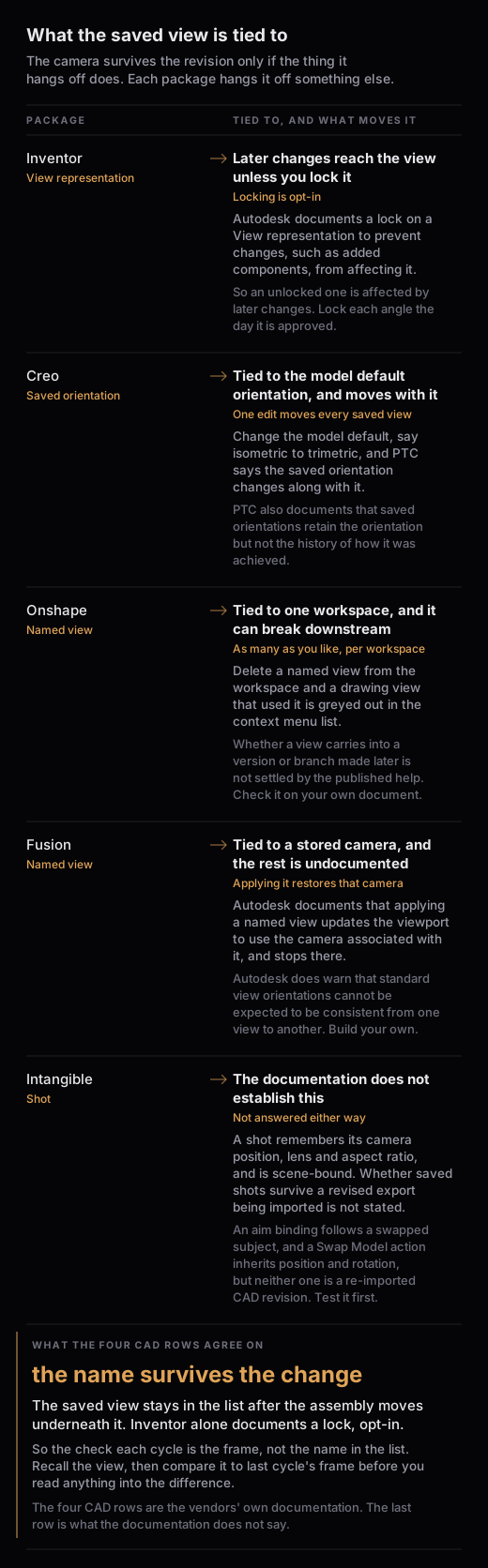
Inventor: lock the view representation
Autodesk states it plainly: "You can lock a View representation to prevent changes, such as added components, from affecting the view." The implication is the useful part. An unlocked View representation is affected by later changes to the assembly, and locking is opt-in rather than the default. If you keep one View representation per review angle, lock each one on the day the angle is approved.
Creo: the saved orientation moves with the model default
A Creo saved orientation is stored relative to the model rather than absolutely. PTC states that "if you change the default orientation of the model (for example, from isometric to trimetric), the orientation of saved orientation changes along with it". One edit to a model-level setting therefore moves every saved orientation you have, all at once, and nobody gets a warning about the review deck. PTC also documents what happens when the geometry references a saved orientation was built from are gone: "saved orientations retain their orientation but do not retain the history of how that orientation was achieved". The view still comes back. What you lose is the record of how it was defined, which is the thing you would need in order to rebuild it deliberately after the next change.
Onshape: the view lives in a workspace
Onshape lets you "create as many named views as preferred, per workspace". That scoping is the thing to hold on to. Whether a named view carries into a version or a branch made after it was saved is not settled by the published help, so check it on your own document before a review depends on it. Onshape also documents a saved view breaking downstream: "if a Named view was inserted and then subsequently deleted from the workspace, it is grayed out in the context menu list" for a drawing view that used it. A tidy-up in one workspace can reach into a drawing somebody else placed.
Fusion: applying a named view restores the stored camera
A Fusion named view stores a camera, and applying it pushes that stored camera back onto the active viewport. Autodesk documents that restore and says nothing about what a model change does to it, so treat the rest of this as reasoning rather than documentation. A stored camera is a set of coordinates, so it should come back the same whichever way the geometry moved, which is what you want while the geometry is stable and a quiet hazard once it is not, because the view name still reads correctly in the list. Check the frame, not the name.
The scene route, and the part that is not documented
In a scene, the camera is an object with its own transform, so nothing about a change in the geometry touches it directly. That is the structural argument for the route. It is also where this article has to be honest about the thing most readers will want next. Intangible's published documentation does not establish whether a scene's saved shots survive the imported model being replaced by a revised export of the same assembly, so nobody should assume it either way from what is public today.
Two adjacent behaviours are documented and neither one answers that question. A camera can be bound to an aim target, and the docs say that when you "move the subject, change the subject's animation, swap the subject for a different one", then "the camera continues to point at whatever object is bound as the target". There is also a Swap Model action where, on clicking a swap target, "the new asset inherits position and rotation", and the same page's limits state that swap stays inside the asset's category. Aim binding and an in-category asset swap are not the same thing as re-importing a revised CAD assembly, so test that case on a low-stakes assembly before a review depends on it.
One documented detail cuts the other way. Smart Import "lands the imported asset in an editing environment that lets you fix scale, orientation, and category before it joins the scene", which is a manual confirmation on every import, so a re-imported revision is not guaranteed to arrive on the same origin as the copy it replaces. Fix the origin and orientation convention in the CAD export, once, and hold it there rather than correcting it by eye each cycle.
The views a recurring review needs, and the order to show them
This section is judgment, not documentation. It is reasoned from the comparability rule above rather than drawn from a surveyed review practice, so treat it as a starting point and cut it to fit how your reviews actually run.
Four frames carry most milestone reviews:
- Two orthographic elevations, on the axes where the packaging constraints live, at identical extents every cycle. These are the frames people measure against.
- One orthographic three-quarter, for reading the assembly as a whole.
- One close frame on the area that changed, at the same lens and the same distance as last cycle, so the change reads as a change rather than as a closer look.
- One context frame at scale, when scale is part of the argument. This is where a perspective camera earns its place.
Show the frames that did not change first, then the one that did. The room calibrates on the unchanged frames, so by the time the changed frame arrives they are reading a difference instead of re-learning the object. Keep the count fixed too. A set that grows by a frame every cycle stops being a comparison and turns back into a presentation.
Where each route stops
The CAD package stops at its own file. Creo's saved orientations move with the model default, Onshape's named views sit in one workspace, and none of them cross to a colleague on a different package or turn into a rendering environment.
Scripting stops at maintenance and access. It gives you exact numbers in a file you control, and it asks for an API, a build step, and a person who keeps it working when the package updates.
The scene stops at the door and at the export. No native CAD format appears in the documented import list, so a CAD assembly is converted to a mesh first. Shots are scene-bound, so a camera set does not travel to another scene, and scene exports "preserve hierarchy, transforms, and cameras", which is how a camera set leaves rather than a way to bring one back. Pulling a finished set out as stills is manual: Intangible states that "downloads happen one render at a time" and that "there's no multi-select or batch-download flow today". At four frames that is a minor cost, and at forty it is not.