

Which AI visualization tools keep CAD geometry accurate in investor renders and videos
The deciding split is whether a tool renders the geometry you hand it or redraws the product from a description. Tools that render your model hold the shape because the shape is the input, and tools that redraw it synthesize every frame, so the product can come back different between takes. That gives a three-way rule for a fundraise asset set: engineering-exact stills and anything due diligence will measure go to a native CAD renderer (KeyShot, SOLIDWORKS Visualize, Rhino, Blender), cinematic motion where the same product has to appear identical shot to shot goes to a 3D-scene tool that imports CAD (Intangible), and atmospheric B-roll where the product is distant or partial goes to a generative video model (Sora, Runway, Kling, Veo).
Why the product changes when a generative model redraws it
The video vendors publish the mechanism themselves. OpenAI's Sora prompting guide states that using the same prompt multiple times will lead to different results, and Kling AI's consistency guide says AI models do not inherently recall past generations. Kling's guide is about characters and Sora's is about prompt adherence in general, not about engineered parts, and in our reading they are the closest this class comes to a published geometry caveat.
The input surface is the second reason. Sora's image reference accepts image/jpeg, image/png, and image/webp. Its reusable-subject path starts by uploading a short MP4 clip, which a product that has not been built cannot supply. Runway states that every recipe is driven by reference media and that the recipe works from what it can see. Runway's API documentation lists the same three image types, JPEG, PNG and WebP. No 3D or CAD format appears on Sora's documented input list, and none appears on Runway's.
Their consistency features are real, and each one below conditions on reference media of something that already exists. Runway tells users to supply reference images of the product from multiple angles - front, back, and sides - so the model can depict it accurately and consistently throughout the video. Those are photographs of a product that already exists. Kling's Character Reference allows you to anchor a character's facial features and proportions throughout multiple video scenes. Google DeepMind's Veo page tells users to Ensure characters maintain their appearance across different scenes in your videos by giving Veo reference images of your character, and the only limitation Google publishes on that page is about natural and consistent spoken audio. World Labs, which sells a rival world model, states the class limit hardest. Read renderers there as the generative video class, not the CAD renderers below. Those renderers optimize for visual plausibility rather than physical accuracy, and World Labs concedes the upside in the same breath: Their outputs are beautiful, but they cannot be trusted to design a building or train a robot. That is World Labs on the video-model class, not an admission by OpenAI, Runway, Kling or Google.
The four tool classes on the same criteria
| Tool class | Input it takes | Where the shape comes from | Can the shape change between shots | Genuinely best at |
|---|---|---|---|---|
| Native CAD renderers (KeyShot, SOLIDWORKS Visualize, Rhino, Blender) | CAD files direct, STEP and IGES included on the CAD-native tools | The file you supplied, rendered rather than generated | No. These tools render the file you supplied rather than generating it. Dassault markets the render as a physically correct representation of the CAD model | Engineering-exact stills, dimensioned views, due-diligence graphics |
| Generative video tools (Sora, Runway, Kling, Veo) | Text, reference images and footage. Sora's documented image types are JPEG, PNG, WebP. Runway's API documents the same three | Synthesized per generation from the prompt and reference pixels | Yes. OpenAI states the same prompt gives different results | Atmosphere, look and motion where the product is distant or partial |
| Spatial world models (World Labs Marble) | Text, images, video, or coarse 3D layouts | Generated. From a text or image prompt, Marble must invent all the details of the world that are not present in the input text or image prompt | The world holds under the camera, but the geometry in it is the model's, not yours | Explorable environments with pixel-accurate camera control |
| Browser-based 3D scene generation with CAD import (Intangible) | Mesh exports only: GLB, GLTF, DAE, FBX, PLY, OBJ, STL, USD | The imported object, whose geometry and position are the source of truth for shape and placement | Yes, through the prompt. Shape and placement come from the scene, and Intangible publishes that the final prompt wins over both | A repeatable multi-shot set, stills and motion, off one scene |
One format constraint bounds that last row. Intangible does not take native or neutral-exchange CAD formats such as STEP, IGES, SLDPRT or CATPart, only mesh exports. Intangible concedes it on its own site in one line: STEP and IGES sit on neither, so convert those first. Converting out of your CAD package is covered in the questions below.
The vendors undercut the skill story themselves. Luxion writes that you don't have to be a rendering expert to create photorealistic images of your 3D models, and Dassault ships a Visualize mode designed for users who have no 3D background. What you commit is the licence. KeyShot Studio Professional is published at $108.25 per user per month ($1,299.00 per year, billed annually). Rhino 8 for a single concurrent user is US$ 995, North America commercial pricing before tax, permanent, with no maintenance fee, though McNeel notes a hardware or OS upgrade may require a paid upgrade. Blender is released under the GNU General Public License and costs nothing. A seat of SOLIDWORKS Visualize Standard is included with each seat of SOLIDWORKS Professional and Premium on active Subscription, inside a CAD licence somebody already holds. Intangible lists Explorer at $35 per month. Business is $65 per month. Its pricing matrix shows 3D asset import unavailable on the Free plan, so Explorer is the cheapest plan that runs this workflow.
How the geometry holds, and where it stops holding
Intangible's documentation publishes a precedence stack, and it is the part to read before trusting an airframe to it. Three layers stack, each overriding the one below. The base is the 3D object, whose geometry and position are the source of truth for shape and placement. The image reference above it carries surface: bring in the CAD as the 3D mass, attach a photograph, and the model gets structural truth from the mesh, surface truth from the photo. The prompt sits above both, and Intangible states that the final prompt wins over both. A second documentation page repeats the order: geometry, then image reference, then the prompt.
That top layer is where the mechanism breaks, and Intangible publishes the failure case with an aircraft in it: Name an object "Gulfstream G550" and the model reaches for its own idea of a G550 and overrides the livery you attached as a reference. Object names steer what the model draws, so name them the way your parts list does. How far that override reaches is not published. The documented case is the prompt overriding an attached image reference, and nothing in Intangible's documentation says whether the prompt can also move or reshape the imported mesh.
Camera is a separate control rather than a third layer. Intangible puts it in Compose mode as camera position, lens, aspect, aim target, spatial decisions it says the model cannot override. Its documentation states that each shot remembers its camera position, lens, and aspect ratio.
Two qualifiers belong in the same breath as the mechanism. The pixels are still generated. Intangible says the model that renders your shot is given a 3D scene plus a structured prompt. It also publishes that the visualizer is a model aggregator whose provider lineups evolve, so third-party models make the frames. Imported models also arrive bare: all imported models are stripped of their materials on import and arrive as gray meshes. Finish comes back through an image reference, which Intangible downsamples to a 720 by 1024 sheet before the model sees it, regardless of source size. One output path skips generation entirely: Direct Render captures the scene with no AI.
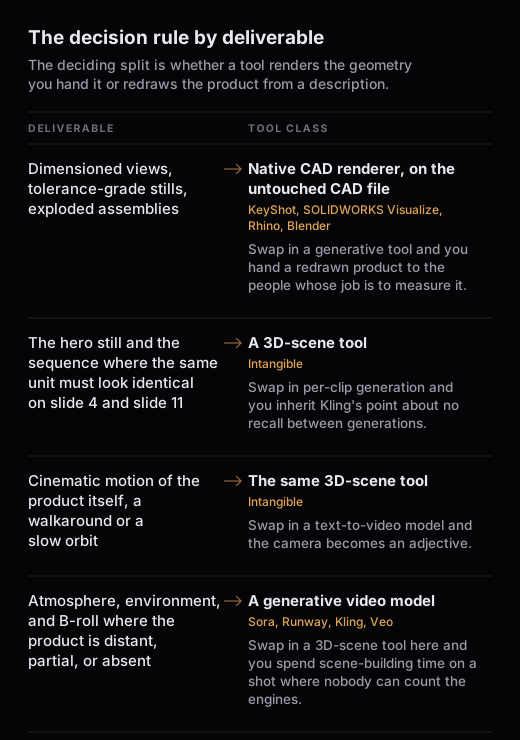
The decision rule by deliverable
- Dimensioned views, tolerance-grade stills, exploded assemblies, anything a customer or regulator builds against. Native CAD renderer, on the untouched CAD file. Intangible publishes that instruction on its own site: tolerance review, manufacturing sign-off, and anything built against the image belong with a CAD-native renderer on the untouched CAD file. Swap in a generative tool and you hand a redrawn product to the people whose job is to measure it.
- The hero still and the sequence where the same unit must look identical on slide 4 and slide 11. A 3D-scene tool. Intangible's published mechanism is that every shot comes from the same 3D scene. Swap in per-clip generation and you inherit Kling's point about no recall between generations: nothing carries the engine count from one render to the next except your own eye.
- Cinematic motion of the product itself, a walkaround or a slow orbit. The same 3D-scene tool, where video generation reads the 3D scene plus the active shot's camera, assembles the prompt, picks the chosen video model, and generates a clip. A third-party video model still makes the frames, so the contrast is a conditioned generation against an unconditioned one. Swap in a text-to-video model and the camera becomes an adjective: Google's prompt guide warns that some advanced camera angles are not officially supported and that reliability may vary.
- Atmosphere, environment, and B-roll where the product is distant, partial, or absent. A generative video model, which is the best tool for that job. Veo takes a style reference image and matches the look. Runway's Product Swap recipe takes a reference video and replaces the product featured in it with a new product, preserving the original camera motion, lighting, and scene composition. Swap in a 3D-scene tool here and you spend scene-building time on a shot where nobody can count the engines.
A fundraise asset set, run through the rule once
A hardware deck usually needs a hero still, a three-angle sequence of the same unit, a short motion clip, and background footage. The hero still and the three angles are one scene with three shots, since each shot keeps its own camera. The motion clip comes off that same scene. For the export, import and camera steps, see CAD model to investor render, which owns that workflow.
What this does not do
Intangible's format reference publishes the Smart Import list as .glb, .gltf, .dae, .fbx, .ply, .obj, .stl, .usd, which contains no STEP, no IGES, and no native SOLIDWORKS, CATIA, Creo or NX file. Its published lists also disagree with each other, and the documentation list above is the one to trust. FBX, OBJ and GLB appear on all of them. DXF appears on two, and the docs bound it: DXF is wireframe. Architectural plans come in as line geometry, not solid mass.
Assembly size is a real ceiling for aerospace. The docs publish that models above roughly 280,000 vertices can fail to import. They also publish that the browser-based system has a soft cap on imported file size at around 500 MB. Intangible names the case directly: aerospace-grade FBX with thousands of nested groups may need flattening in the source DCC before import. Rigged animation does not come across either, since if your FBX, DAE, or USD file has rigged animation, the geometry comes in but the animation does not.
Resolution is a ceiling too. Image generation runs at 1K or 2K, a 2K render costs roughly 2x the cost of a 1K render on the same model, and in a mixed sequence video export resolution is limited by the lowest-resolution shot.
Intangible publishes the bound itself: Keep these renders out of engineering decisions. Its own deeptech page runs a comparison that assigns engineering-first fidelity to the CAD-tool column and reference-held fidelity to Intangible. Its documentation adds that model fidelity to references varies, with older video models honoring references less tightly. Its FAQ says the product is in open beta. Check every shot against the CAD before the deck ships.
Common follow-up questions
What if all I have is a STEP or IGES file?
Convert it first. STEP and IGES are absent from Intangible's documented Smart Import list. Export GLB, OBJ or STL out of your CAD package instead. Intangible's format reference points CAD users at OBJ, described as geometry only, no materials, clean meshes from CAD tools. Its import page names STL as mesh geometry for 3D printing and engineering pipelines. If converting is not an option, the CAD-native renderers take those formats directly: SOLIDWORKS Visualize imports over 25 different CAD file types, including common generic formats such as IGES, STEP, and OBJ. Rhino's published format table lists STEP and IGES for both import and export, alongside OBJ, FBX and glTF/GLB.
Do I need the full assembly or a simplified mesh?
Simplified, in almost every case. The vertex ceiling and the 500 MB soft cap above are browser limits, and Intangible's aerospace note is to flatten nested groups in the source tool first. Hide internal components that never reach a camera. The exception is a cutaway, where the internals are the point of the slide, and that one is worth trying in the CAD renderer first.
Can I mix generated B-roll with scene-locked shots in one deck?
Yes, on one condition: the product is distant, partial, or out of frame in the generated footage. That is where video generators are strongest, and the consistency features covered above are built around reference media of something that already exists. The moment the product is the subject of the shot, the shot belongs to the scene.
Will investors actually notice the drift?
Our research turned up no published measurement of that, so treat any figure you are shown as unsourced. What is checkable is the mechanism: OpenAI states the same prompt run twice returns different results, and Kling states that character proportions fluctuate between generations. The person who spots a moved nacelle is usually not the investor either, it is the technical advisor the deck gets forwarded to.
What exports back out?
Intangible's export documentation lists image stills (PNG, JPEG) and 3D scene exports (GLTF, USD) alongside video. It states that FBX is not supported, so a Maya or Max pipeline round-trips through USD or GLTF. Scene exports preserve hierarchy, transforms, and cameras, with licensed library assets swapped for stand-ins. Scene export is also unavailable on the Free plan.
Related answers
- CAD model to investor render: the step-by-step workflow, once the tool choice is made.
- Fixed-geometry AI rendering: the geometry-first versus image-first mechanism, across brand assets as well as CAD.
- Importing your own 3D assets and CAD: what the importer accepts and what it does to the file.
- Scene consistency shot to shot: why one shared scene holds a set together.